Wajid Rashid

Junior backend developer · Islamabad, Pakistan

I'm learning backend development full time and building as I go. I use Ubuntu every day. Below is what I've built, with the real code: a ticketing platform you can try live, a MySQL database, and a Bash script. Then a log of what I'm learning now.

Work

TicketForge

Nov 2026

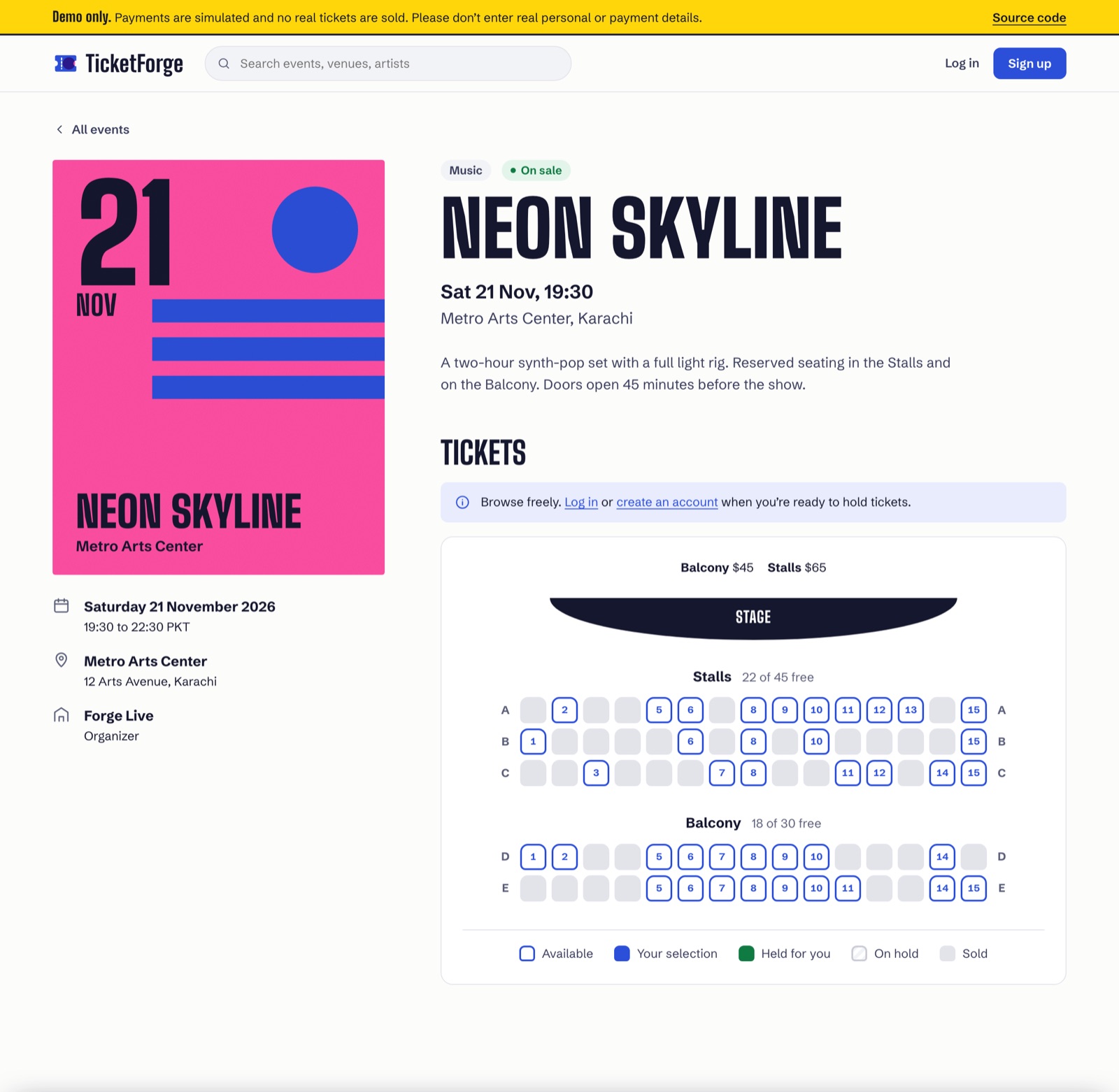
An open-source ticketing platform for gigs, comedy, talks and sport. Fans pick seats on a live map, hold them for 10 minutes while they pay, and get PDF tickets with signed QR codes that scan once at the door. Organizers get a dashboard with revenue, check-ins and live sales.

  • Django
  • FastAPI
  • MySQL
  • WebSockets
  • Celery
  • 241 tests, 92% coverage
A TicketForge event page: the Neon Skyline concert in Karachi, with a seat map of the Stalls and Balcony showing free and sold seats

backup.sh packs a folder into ~/backups as a timestamped .tar.gz and keeps only the 5 newest backups. test.sh runs it on a temporary folder and checks that the archive was created. Both stop at the first error (set -euo pipefail).

Done through GitHub the way a team works: an issue, a branch, and pull requests that close it.

  • Bash
  • tar, find, mapfile
  • 5 commits
backup.sh · 28 lines
shell-practice/backup.shlines 1–28 @ 8521105 ↗
#!/usr/bin/env bash
set -euo pipefail
TARGET_DIR="${1:-}"
if [[ -z "$TARGET_DIR" ]]; then
    echo "Usage: $0 <folder_to_backup>"
    exit 1
fi
if [[ ! -d "$TARGET_DIR" ]]; then
    echo "Error: Directory '$TARGET_DIR' does not exist."
    exit 2
fi
BACKUP_DIR="$HOME/backups"
mkdir -p "$BACKUP_DIR"
TIMESTAMP=$(date +"%Y-%m-%d_%H-%M-%S")
BACKUP_FILE="$BACKUP_DIR/backup_$TIMESTAMP.tar.gz"
tar -czf "$BACKUP_FILE" -C "$(dirname "$TARGET_DIR")" "$(basename "$TARGET_DIR")"
cleanup_old_backups() {
    mapfile -t backups < <(find "$BACKUP_DIR" -maxdepth 1 -type f -name "backup_*.tar.gz" | sort -r)
    if (( ${#backups[@]} > 5 )); then
        rm -f "${backups[@]:5}"
    fi
}

cleanup_old_backups

BACKUP_SIZE=$(du -h "$BACKUP_FILE" | cut -f1)
echo "Backup complete: $BACKUP_FILE ($BACKUP_SIZE)"
test.sh · 21 lines
shell-practice/test.shlines 1–21 @ 8521105 ↗
#!/usr/bin/env bash
set -euo pipefail

TEST_DIR=$(mktemp -d)
echo "test" > "$TEST_DIR/sample.txt"

OUTPUT=$(./backup.sh "$TEST_DIR")
echo "$OUTPUT"

CREATED_FILE=$(echo "$OUTPUT" | awk '{print $3}')

if [[ -f "$CREATED_FILE" ]]; then
    echo "Test passed: $CREATED_FILE was created."
else
    echo "Test failed: Backup file not found."
    rm -rf "$TEST_DIR"
    exit 1
fi

rm -rf "$TEST_DIR"

The 10 programs that write most to the system log:

shell-practice/ANSWERS.mdline 19 @ 8521105 ↗
cut -d ' ' -f 5 system.log | cut -d '[' -f 1 | cut -d ':' -f 1 | sort | uniq -c | sort -rn | head -n 10

Learning log

I'm working through a study plan of 143 hands-on tasks, from the terminal to APIs, databases and deployment. I started on 3 November 2026.

Now Practise branches, conflicts and fixing mistakes in Git

  1. Write Bash scripts that do real work shell-practice ↗
  2. Find anything with pipes and grep shell-practice ↗
  3. Put your first project on GitHub dev-setup ↗
  4. Set up Anki and learn how to remember what you learn
  5. Learn to move around in the terminal
The whole plan · 22 parts

Backend

  1. Getting started5/9
  2. Python by doing12
  3. Working in a team on GitHub14
  4. Docker4
  5. MySQL by doing8
  6. Data analysis with Jupyter and pandas4
  7. How the web works3
  8. Your first APIs3
  9. orderflow: the API4
  10. orderflow: orders and payments8
  11. Django12
  12. orderflow: speed and scale7
  13. Security and quality10
  14. A full project from nothing5

DevOps

  1. Linux servers6
  2. Your own network and Git server5
  3. Automation4
  4. Shipping your code5
  5. Keeping it running6
  6. Kubernetes8
  7. Cloud5
  8. A full project from nothing1

Tools I've used

Python
Django and Django REST Framework, FastAPI with SQLAlchemy and Alembic, Celery jobs, WebSockets with Django Channels. (TicketForge)
Testing
pytest against real MySQL and Redis, a 50-thread race test, a Hypothesis property test, Locust load tests, ruff and mypy in CI. (TicketForge)
Docker and deployment
Docker Compose for the whole stack, nginx with TLS and rate limits, GitHub Actions, and a live deploy on a VPS with Dokploy. (TicketForge)
SQL and MySQL 8
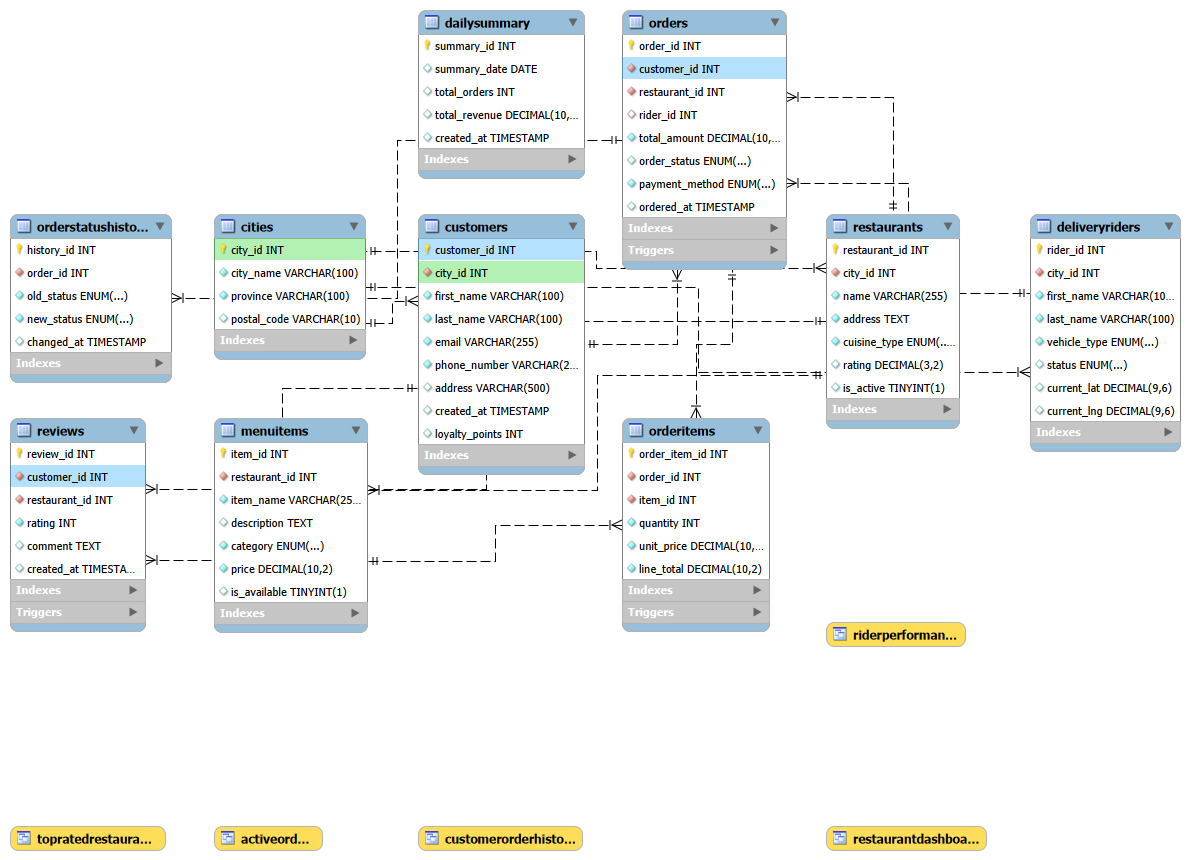
Tables with foreign keys, CHECK and UNIQUE rules, joins, subqueries, grouping, views, functions, triggers and scheduled events. Conditional updates and row locks so two buyers cannot get the same seat. (PakBites, TicketForge)
Bash
Pipes, grep, cut, sort and uniq, find, tar, and scripts that check their input and stop on errors. (shell-practice)
Git and GitHub
Branches, issues, pull requests and fixing a merge conflict. (PakBites, shell-practice, TicketForge)
Linux (Ubuntu)
My daily system. journalctl, ps and kill, file permissions. (shell-practice)
Up next
Python by doing, from my study plan.

Contact

I'm looking for remote work. Email me at i.wajidrashid18@gmail.com, or see my code on GitHub. My CV is here (PDF).